Getting your antenna pointed in the right direction for a Silicon Dust HDHomerun tuner isn't too big of a chore if you have an Android phone and a little patience.
I'm assuming you have an HDHomerun tuner plugged into your network.
First, figure out what kind of antenna you need. AntennaWeb is a great resource for this. Provide your street address and zip code and it'll tell you how far away TV stations are from your house and which direction you need to point your antenna.
I went a little overkill and bough the DB4e antenna from Antenna's Direct.
Next, figure out how you'll mount your antenna. For me, I found a broken shower curtain rod that I used for a mounting pole in a scrap piece of lumber. I then attached the scrap piece to the joists in the attic.
Using the degree values from AntennaWeb, point your antenna in the right direction. There's a great free Compass app available in the Android store. Point the top of your phone in a direction and it'll tell you which direction in degrees you are pointing in the bottom left corner.
.
Use the HDHomeRun Setup application on your computer to scan for channels. This can be found under the Digital Antenna tab. After you hit scan, you'll see all the channels your antenna can tune.
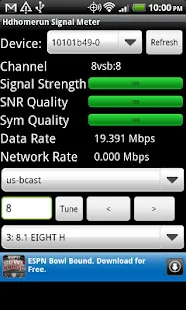
To watch a channel, click on one of the hyperlinks. If the quality is less than desired, adjust the antenna. If the antenna is far away from your computer (like mine), there's another awesome free Android app that can check signal strength: HDHomerun Signal Strength.
Hopefully, with just a couple of adjustments using the Compass and Signal Strength apps, you'll reach optimal tuning. This was a big help for me and my antenna mount in the attic. Here it is after just an hour or so of mounting and adjusting.
Time Warner Cable is expensive. Despite that, I still fork over money to them every month. I try to reduce my costs as much as I can by only subscribing to only their most basic packages, such as the just the basic cable package, which provides only the network channels (ABC, NBC, CBS, FOX, etc) for around $20 a month.
We don't have one of their cable boxes, which can allow you to record channels and watch them later. A wonderful service, but I'm way too cheap for that. Instead, I use a computer to record the channels through the wonderful SageTV software. Unfortunately, the SageTV company was bought out by Google and the software can no longer be purchased.
To tune in the channels with the computer, the SageTV software interacts with a nifty device from Silicon Dust called the HDHomerun. It's a TV tuner that hooks up to your network. I've been using one of these for years with little complaint.
Note, though, that I said "little." I had an older model that kept misbehaving. It took me a couple of months of troubleshooting before giving up and just replacing the device. Before I got there, I tried a couple of other approaches. I thought my computer might be the culprit, so I rebuilt it and set it up to reboot every night (as I discussed here a couple of weeks ago). I also set up the HDHomerun TV tuner to reboot nightly through a quick and dirty program and a scheduled task.
Creating the means to reset the HDHomerun was actually a lot easier than I thought. I first found this document from Silicon Dust explaining how you can interact with a Silicon Dust program installed on my computer that interacts with the tune (hdhomerun_config.exe). I then found the following function in the application available through their help file.
set /sys/restart self
This is the command I need to restart the HDHomerun tuner.
I created a bat file with the following line through Notepad.
"c:\Program Files\Silicondust\HDHomeRun\hdhomerun_config.exe" 10324a85 set /sys/restart self
The 10324a85 is the unique number given to my tuner so the hdhomerun_config program knows which tuner to reset. You can get this number through the HDHomerun Setup program which is accessible through the Start menu. The unique number is listed right here:
I then set up a scheduled task to run this program regularly to reset my tuner.
For instructions on creating the bat file and setting up the scheduled tasks, I discussed both in a post I did a couple of weeks ago on how to set up your PC to reboot regularly. The process should be pretty similar.
Even though I've replaced the tuner I was originally using when I set this up, I still reset the new tuner every night. I figure it doesn't hurt anything.
I'm happy with my setup, but wish I could continue to reduce my cable bill. In a month or so, I'm going to start experimenting with antennas to see if I can get TV reception over the air. I'm a bit skeptical, though. My house is in a pretty wooded area and I'm not too fond of mounting an antenna on my roof.
Will my frugality and curiosity win out over my fear of heights? Stay tuned!